
As a leading GST consultant in Kolkata, we closely monitor the GST return structure updates to ensure our clients remain fully compliant. The introduction of the GST Invoice Management System (IMS) fundamentally changes how taxpayers interact with the GST IMS portal and heavily impacts the latest ITC claim rules 2024.
Here is a breakdown of how the IMS works, the timeline you need to follow, and the actions required to ensure seamless GST compliance for your business.
What is the GST Invoice Management System (IMS)?
The IMS acts as a gateway or holding area for your incoming invoices. If a supplier uploads and saves an invoice in the portal—even if they haven't filed their GSTR-1 or IFF return yet—that invoice will be available in the recipient's IMS dashboard. For e-invoicing, the invoices will automatically upload to the IMS as soon as they are generated, meaning no manual upload is needed.
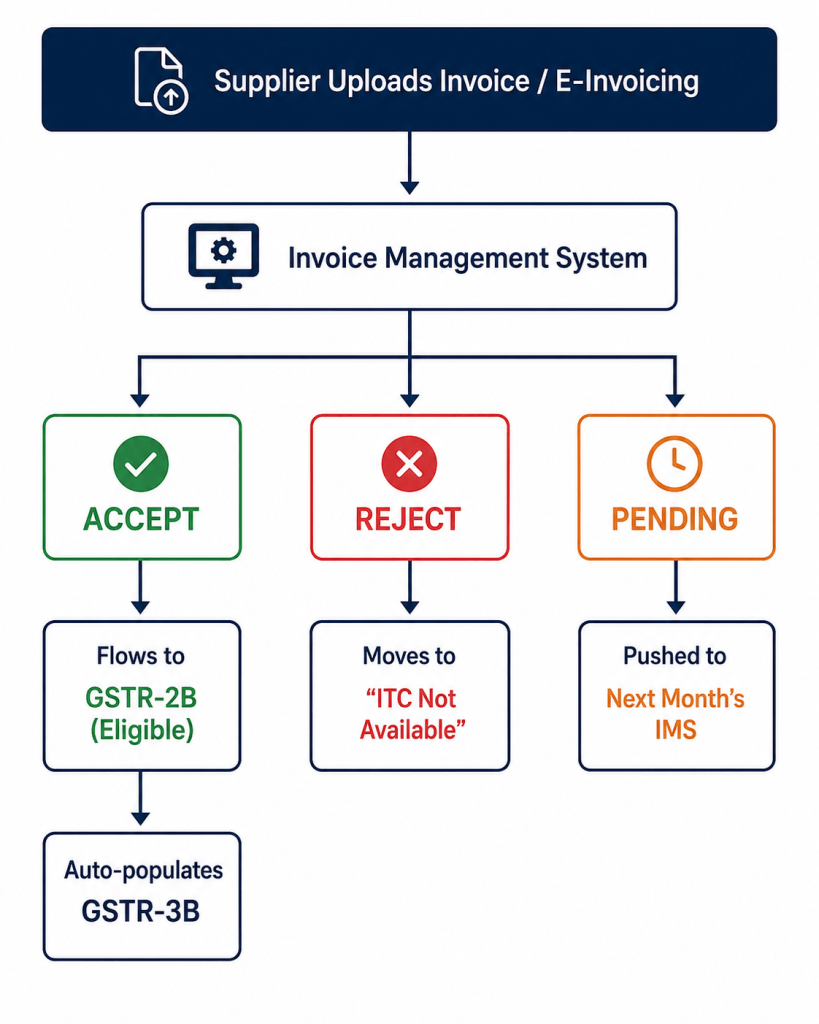
Every invoice a supplier files will technically "flow" into your GSTR-2B, but the action you take in the IMS determines which "folder" it ultimately lands in.
The IMS Action & Decision Matrix
To help you visualize the flow from the supplier's invoice to your final credit ledger, follow this step-by-step decision path based on the new return framework:
| If Supplier Does This... | It Enters Your IMS As... | Your Action Required | Final GSTR-2B Destination |
|---|---|---|---|
| Uploads & saves invoice (or via e-invoicing) | Pending Review | Accept | Flows to "ITC Available" & auto-populates GSTR-3B. |
| Uploads incorrect or mismatched invoice | Pending Review | Reject | Moves to "ITC Rejected". Will NOT flow to GSTR-3B. |
| Invoice needs verification or goods not received | Pending Review | Keep Pending | Transfers out to the next month's IMS dashboard. |
| No action taken by cutoff date | Unchanged | No Action | Deemed Accepted. Becomes part of your Final GSTR-2B. |
How to Accept or Reject Invoices in IMS: The 4 Actions
Once an invoice is in the IMS, the recipient has a choice to make. You can take action in the IMS until the cutoff date of GSTR-3B or until you submit your GSTR-3B, whichever is earlier.
- Accepted: These invoices go to the "ITC Available" section of GSTR-2B. These values are auto-populated into your GSTR-3B for you to claim credit.
- Rejected: These invoices go to the "ITC Rejected" (or "ITC Not Available") section of GSTR-2B. These values will NOT flow into your GSTR-3B.
- Pending: These invoices will transfer to the IMS for the next month, where they can then be accepted, rejected, or kept pending for future IMS.
- Deemed Accepted GST IMS: IMS is technically optional; if you do not touch your IMS, your draft 2B will become your final 2B. At the time of GSTR-2B generation, a record is considered "Deemed Accepted" if no action is taken.
Draft GSTR-2B vs Final GSTR-2B
Under the new GSTR-2B rules, the concept of a static GSTR-2B has changed. GSTR-2B will only be final during the filing of GSTR-3B; before that, it will remain a draft.
Understanding the Draft
On the 14th of the month, a Draft GSTR-2B is generated. You can change this draft anytime before filing GSTR-3B.
Adding Late Invoices
If you did not accept an IMS invoice that showed up before the 13th, but you accept it after the 14th, it will be added to your Draft 2B (provided the supplier filed their GSTR-1/IFF before the cutoff date). Only invoices from suppliers who filed before the cutoff date go from IMS to 2B for that month.
The Final Calculation
The Final GSTR-2B is calculated as the Recomputed Draft GSTR-2B, less Rejected Invoices, less Pending Invoices. Once the respective GSTR-3B is filed, all accepted, deemed accepted, and rejected records will move out of the IMS dashboard.
The Monthly GST Return Timeline
To keep track of this flow under the GST return structure 2024, here is the standard monthly timeline:
- 1st day of month: GSTR-1 is available.
- 11th of month: GSTR-1 due date.
- 14th of month: DRAFT GSTR-2B generated.
- 20th of every month: GSTR-3B due date.
3 Critical Rules for ITC Claim Rules 2024
- Sequential Filing: GSTR-2B is now sequential. The system will only generate a GSTR-2B for a return period if the GSTR-3B of the previous return period has been filed.
- Supplier Liability Increases: A supplier's liability in subsequent GSTR-3B filings will increase in specific cases if the recipient rejects certain documents on their end. These include the rejection of an original credit note, rejection of an upward/downward amendment of a credit note, or rejection of a downward amendment of an Invoice/Debit note.
- Amendments: Any amendment in GSTR-1 filed for the current tax period will effect the current month GSTR-3B via GSTR-1A.